Dynamic Educational Video Overlay System
Engineering an automated, time-saving MOGRT framework for video courses with seamless multi-topic state tracking.
Project Overview
The client required a clean, professional motion graphics overlay template for long-form video courses and online lectures. The goal was to provide students with clear visual cues—including dynamic topic tracking, active countdown timers, and current lesson titles—without overburdening the post-production team during editing.
The core engineering achievement was a "populate-once, duplicate-everywhere" architecture that drastically reduces timeline editing overhead for hours of lecture footage.
The Time-Saving Workflow Architecture
Instead of forcing editors to re-enter text and titles for every scene change, the MOGRT was built with a centralized data-duplication logic:
-
01
Initial Population:
The editor inputs all global course data (up to 8 topic names and extended titles) into the master template once on the Premiere Pro timeline.
-
02
Instant Duplication:
To move to subsequent sections, the editor simply copies the MOGRT block, selects the next topic number from a single dropdown (e.g., "Topic 2", "Topic 3"), and sets the section duration.
-
03
Seamless State Transitions:
The system automatically matches state changes—updating pending, current, and completed topic highlights—and executes invisible, seamless transitions between copied clips without timeline visual cuts.
System Specifications & UI HUD Layout
-
Dynamic 3-State Topic List:
Visually distinguishes upcoming (Pending), active (Current Highlight), and finished (Past) topics with synchronized color schemes.
-
Auto-Hiding Topic Slots:
Built with conditional expressions where empty text fields automatically suppress unused slots (e.g., hiding slots 7 and 8 by default if a course only has 6 modules).
-
Dynamic Current Topic Banner:
Synchronized lower banner updating long-form topic descriptions in real-time as state triggers fire.
-
Real-Time Countdown Engine:
An accurate, smooth countdown timer tracking duration for each individual discussion segment (configurable up to 60 minutes per topic).
-
Integrated Image Media Slot:
Built-in placeholder allowing instant replacement of topic-related vector imagery or slides.
-
Smart Intro Logic:
Expression-driven intro animation that strictly fires only on Topic 1, skipping redundant introductions during mid-lecture cuts.
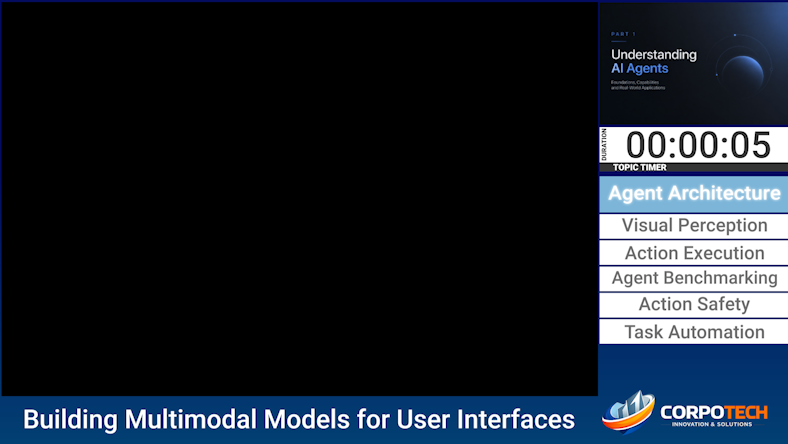 Active HUD overlay layout showing the multi-state navigation list and
live timer engine.
Active HUD overlay layout showing the multi-state navigation list and
live timer engine.
Request Custom Educational Overlay System
Streamline your online course production, automate topic navigation tracking, and reduce post-production timelines to seconds.
Request Custom Educational Overlay System